Modbee: A Modern Sans Serif Font for Digital Branding
I was working on a redesign for a boutique online store, and the first thing I noticed was how crucial the right font could be. It wasn’t just about aesthetics—it was about readability, brand tone, and user experience. That’s when I stumbled upon Modbee.
What Is Modbee?
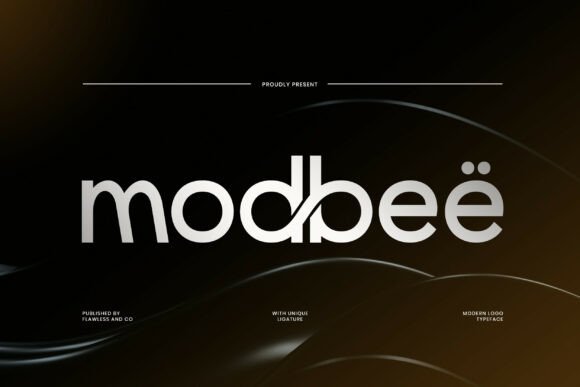
Modbee is a sleek and modern sans serif typeface that immediately caught my eye with its clean lines and unique ligature style. Unlike many other fonts in the same category, it has a subtle elegance that feels both professional and approachable. Its balanced letterforms give it a sense of professionalism, making it ideal for contemporary branding efforts.
As a web designer, I always look for fonts that are not only visually appealing but also perform well across different screen sizes and backgrounds. Modbee checks all these boxes. It doesn’t feel too bold or too minimal—just right for a wide range of digital projects.
Testing Modbee in Real Projects
I decided to test Modbee on a hero section for the online store I was working on. The background image was a high-quality photo of the products, and I wanted the headline to stand out without overpowering the visual. I used Modbee for the main headline, and the result was impressive. The font didn’t clash with the image; instead, it added a layer of sophistication.
Next, I tried using it for the navigation menu and body text. While Modbee is more of a display font, I found that lighter weights worked well for subheadings and call-to-action buttons. It maintained clarity even at smaller sizes, which is essential for mobile responsiveness.
Where Can You Use Modbee?
Modbee shines in several areas of web design. For instance, it’s perfect for website headers, hero sections, landing pages, and call-to-action areas. It works well with online shop banners, blog graphics, digital ads, course pages, portfolio sites, campaign pages, and branded web content.
Its clean appearance makes it especially effective for websites that want to convey a modern, trustworthy, and polished brand identity. Whether you’re building a creative portfolio, a coaching website, or a product landing page, Modbee can help elevate the overall design.
Readability and User Experience
One of the most important aspects of any font is readability. I tested Modbee on various screen sizes and found that it performed exceptionally well on mobile devices. The spacing between letters and the stroke weight made it easy to read, even on smaller screens.
When designing for dark backgrounds, I noticed that Modbee still maintained good contrast. It didn’t get lost against dark colors, which is a common issue with some sans serif fonts. This flexibility makes it a great choice for designers who need to create responsive layouts that work across multiple environments.
Font Pairing and Styling Options
Modbee pairs well with other fonts, especially when you want to add a bit of contrast to your design. For example, pairing it with a simple serif font for body copy can create a nice balance between modernity and tradition. This combination works well for editorial designs or content-heavy websites like blogs or course sales pages.
It’s also worth noting that Modbee offers multiple weights and styles, which gives designers more control over their typography. From light to bold, each variation adds a new dimension to the design possibilities.
Practical Tips for Using Modbee
If you're considering using Modbee on your website, make sure to check the available styles, webfont formats, and licensing options. It’s important to ensure that the font supports multilingual characters if your site targets a global audience.
Also, remember to use it judiciously. While Modbee is versatile, it’s best suited for headlines, section headings, and decorative accents rather than long blocks of body text. Let it shine where it matters most without overwhelming the reader.
Finally, always test the font in real-world scenarios. How does it look on different devices? Does it load quickly? Will it work well with your color palette and imagery? These are all practical questions that will help you determine whether Modbee is the right fit for your project.